 Flex Music Labs
Standalone piano and VST3 plugin
PianoFlex Player
Session Player, PianoFlex's piano, to play from a MIDI keyboard, from ComposerFlex or from your music program. Open any MIDI file and turn it into audio or a song video. It costs nothing, with no key to enter and no account to make.


What it does
A piano to play, and to make audio and video with.
Session Player
PianoFlex's own piano: a grand with a balanced, even sound that suits almost any music. It doesn't play back recordings of a piano. It works out the sound of each note as you play it, from a model of a piano's hammers, strings and soundboard built on measurements of real grand pianos.
Play it your way
Play from a MIDI keyboard, click the keys on the screen, or let ComposerFlex play it: the Player comes with ComposerFlex. The sustain, sostenuto and soft pedals all work.
Standalone or plugin
Use it as a program of its own, or load it as a VST3 plugin in any music program that hosts them. Your program keeps the room and volume with the project.
Open a MIDI file
Open a MIDI file, play it and stop it. If you have ComposerFlex, the box opens on its newest songs.
Render to audio
Write the song you opened as a 24-bit FLAC file, played by Session Player in the room you chose, and saved in Documents\PianoFlex\recordings.
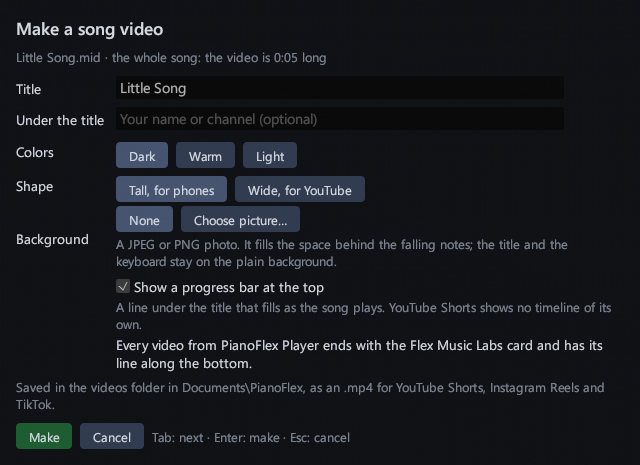
Make a song video
Make a video of the song you opened: the notes fall onto a full 88-key keyboard as it plays. Every video carries the Made with line along the bottom and ends with the Flex Music Labs end card.
Share it
PianoFlex Player is free. Install it on as many computers as you like, for any purpose, including commercial work. You may share the installer with anyone, as long as you share it complete and unchanged and do not sell it or charge for it. You may not modify the program or the videos it makes. Every video carries the Made with line along the bottom and ends with the end card.
Details
| System requirements | Windows 10 and 11, 64-bit |
|---|---|
| Formats | Standalone program and VST3 plugin, 64-bit |
| Piano | Session Player, with four rooms to hear it in: Studio, Dry, Living Room and Concert Hall |
| Cost | Nothing. It needs no license key and no account |
| Internet | The Player makes no connection to the internet. Its links open in your web browser |
| Guide | The PianoFlex Player guide, also installed with it |
More pianos, and every control
PianoFlex has 34 presets, every control to shape their sound, and it records what you play. You can try it first. ComposerFlex composes the songs that the Player plays, and the Player comes with it.